How paysafecard Works and Where to Buy It: 2026 Guide
 Łukasz Kafel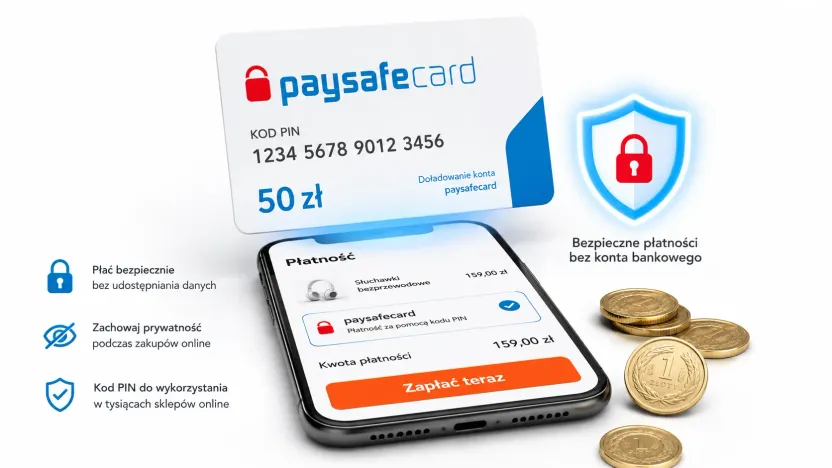
paysafecard is a prepaid payment voucher in the form of a 16-digit PIN code. You buy a code of the value you choose, and when you pay online you simply enter the PIN — without giving any card details or bank account information. It is one of the simplest and safest ways to pay online, including for people who do not have a payment card.
What is paysafecard and how does it work?
paysafecard works like cash on the internet. You buy a code of a chosen value, then at the checkout of a shop or service you select paysafecard as the payment method and enter the PIN. You do not create an account, link a card or share any personal details.
- Paying with the code alone is usually allowed up to around EUR 50 per transaction (PLN 200 in Poland, as of July 2026 — in line with paysafecard’s terms).
- You can combine several codes in a single payment if the amount is higher.
- Any leftover balance on a code can be used for your next purchases.
Where to buy paysafecard with no commission?
You can buy a paysafecard code online at payticon.com — commission-free, with the code delivered by email right after purchase and with automatic cashback in the form of “ticony” points. You do not have to look for a physical retail point or wait — the PIN lands in your inbox within moments.
Besides the classic code, there is also paysafecard direct — a convenient form of fast payment/top-up without a physical code.
Where can you pay with paysafecard?
paysafecard is accepted by hundreds of services, including the most popular platforms for gamers and app users:
- Games and platforms: Steam, PlayStation Store, Xbox, Nintendo eShop, Epic Games, Riot Games.
- Apps and stores: Google Play and many other digital services.
- Online services where you would rather not enter your bank card details.
How to pay with paysafecard step by step?
- At the checkout of a shop or service, select paysafecard as the payment method.
- Enter the 16-digit PIN from the code you bought.
- Confirm the payment — the amount will be deducted from the code’s balance.
- If the amount exceeds the value of one code, add another PIN and cover the rest.
You do not need to provide card details or a bank account — the code alone is enough.
In what denominations can you buy paysafecard?
Codes are available in several values — from small amounts up to a few hundred — so you can match the denomination to a specific purchase: a game, a subscription or a wallet top-up. You can check the current denominations and prices on the product page.
How to top up your Steam account with paysafecard?
Yes — you can top up your Steam wallet with paysafecard. The key rule after recent changes: the code must come from the same region as your Steam account. If you have a Polish Steam account, use a paysafecard code bought in Poland.
- Buy a paysafecard code in the right denomination (e.g. at payticon.com).
- Log in to Steam and select “Add funds to your Steam Wallet”.
- Choose paysafecard as the payment method.
- Enter the 16-digit PIN and confirm — the funds will land in your Steam wallet.
paysafecard (the code) vs my paysafecard (the account) — what’s the difference?
| Feature | paysafecard code | my paysafecard account |
|---|---|---|
| Registration | Not required | Requires an online account |
| Payment | Enter the 16-digit PIN | Log in with username and password |
| Transaction limit | Up to around EUR 50 | Higher limits per the terms |
| Best for | One-off payment, gift | Regular payments, convenience |
If you pay occasionally or buy a code as a gift, the plain code is enough. If you use it often, a my paysafecard account simplifies payments and raises the limits.
How much does paysafecard cost? Fees and code validity
When you buy a code, you pay the equivalent of its face value — and at payticon.com with no commission. It is worth knowing two rules from the official paysafecard pricing:
- Code validity: the code has no fixed expiry date — it stays valid as long as there are funds on the balance (promotional codes can be an exception).
- Inactivity fee: if a code stays unused for a full month after purchase, a monthly fee is deducted from the balance (in the local currency of the voucher; PLN 10 in Poland as of July 2026) until the funds run out. The balance never goes below zero.
Tip: to avoid the fee, use the code in full within the first month.
Is paysafecard safe?
Yes. When you pay with a code, you do not share any card details or bank account information — you only enter the 16-digit PIN. This reduces the risk of leaking sensitive data and makes it easier to control your spending, because you can only spend what is on the code. For safety:
- Buy your code only from authorized sellers (such as payticon.com) and never share the PIN with third parties.
- Treat the PIN like cash — whoever knows it can use it.
- Keep your proof of purchase until you have used the code.
Is paysafecard a good gift?
Yes — especially for gamers and people who value their privacy. The code arrives by email, the recipient does not have to enter any card details, and they can spend the funds wherever they like: on games, subscriptions or online shopping. You can buy a paysafecard as a gift in just a few moments.
Does paysafecard expire?
A paysafecard code has no fixed expiry date — it stays valid as long as there are funds on the balance. Note: if a code stays unused for a full month after purchase, a monthly inactivity fee is deducted from the balance, gradually reducing it.
What is the paysafecard payment limit?
Paying with the code alone, you can spend up to around EUR 50 per transaction. A my paysafecard account allows higher limits in line with the terms.
Can I pay with paysafecard on Steam?
Yes — you can top up your Steam wallet. Remember that the code must come from the same region as your account (a Polish Steam account → a Polish paysafecard code).
Where can I buy paysafecard with no commission?
At payticon.com — the code arrives by email right after purchase, with no commission, and you also collect cashback in “ticony” points.
Do I need an account to use paysafecard?
No. The code (PIN) alone works without registration up to around EUR 50 per transaction. A my paysafecard account is optional and gives you higher limits plus login-based payment.
Can I combine several paysafecard codes?
Yes. In a single payment you can use several PIN codes to pay a higher amount.
Is paying with paysafecard safe?
Yes — you pay with the 16-digit PIN alone, without giving any card details or bank account information. Buy your code only from authorized sellers and never share the PIN with anyone.
Have questions about payments, invoices or code delivery time? Take a look at the payticon.com FAQ. Ready to buy? Buy paysafecard — the code by email in just a few moments.
Table of contents
- What is paysafecard and how does it work?
- Where to buy paysafecard with no commission?
- Where can you pay with paysafecard?
- How to pay with paysafecard step by step?
- In what denominations can you buy paysafecard?
- How to top up your Steam account with paysafecard?
- paysafecard (the code) vs my paysafecard (the account) — what’s the difference?
- How much does paysafecard cost? Fees and code validity
- Is paysafecard safe?
- Is paysafecard a good gift?